Usage
Read data
Most data in Trixnity is wrapped into Kotlins Flow. This means, that you
get the current value, but also every
future values. This is useful when e.g. the display name or the avatar of a user
changes, because you only need to
rerender that change and not your complete application.
There are some important data, which are described below:
Rooms
To get the room list, call matrixClient.room.getAll(). Use .flatten() or flattenValues() to flatten the Flow of
Flows.
With matrixClient.room.getById(...) you can get one room.
Users
To get all members of a room, call matrixClient.user.getAll(...). Use .flatten() or flattenValues() to flatten the
Flow of Flows.
Because room members are loaded lazily, you should
also call matrixClient.user.loadMembers(...) as soon as you open a room.
With matrixClient.user.getById(...) you can
get one user.
Timeline and TimelineEvents
The easiest way to compose a timeline is to call matrixClient.room.getTimeline(...).
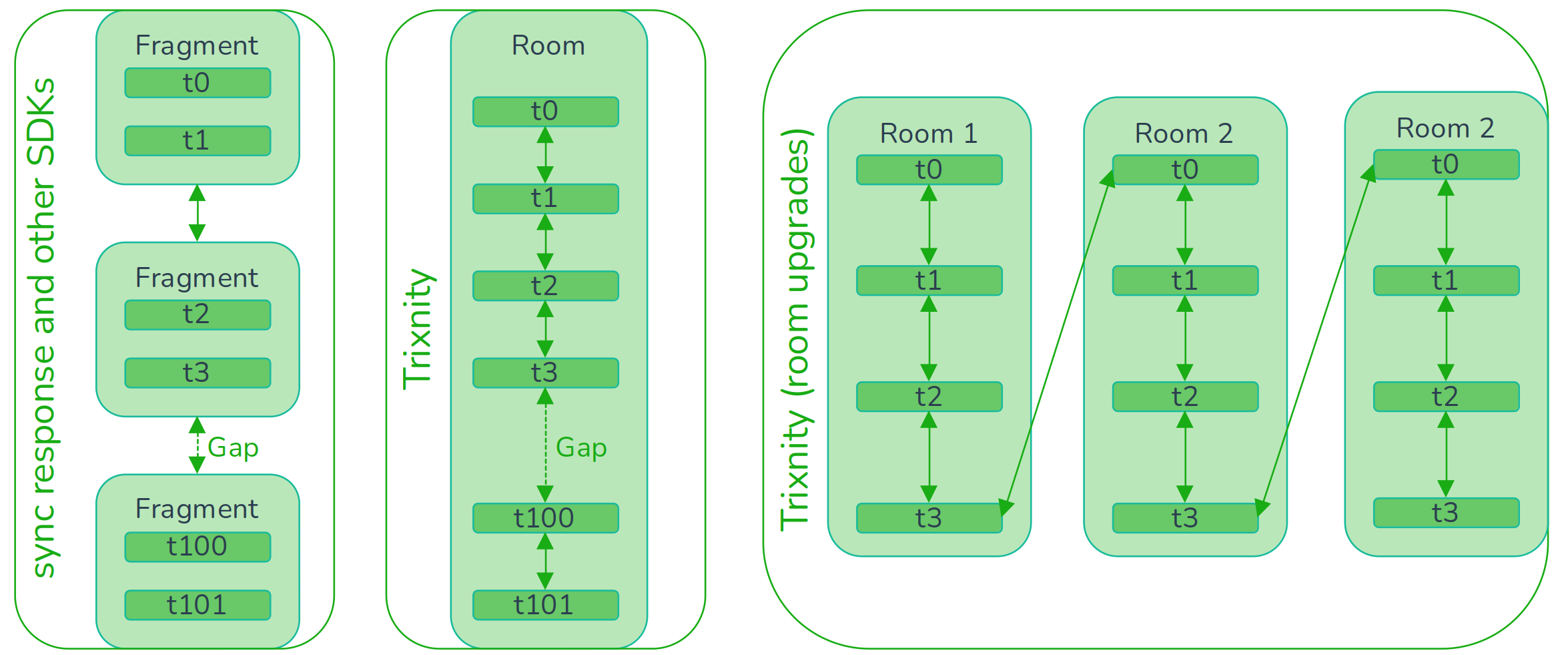
Normally a sync sends a fragment of the timeline to the client. There also can be gaps. Other clients save this almost
the same into the database, so with fragments pointing to each other.
In Trixnity there are no fragments. One TimelineEvent represent one event in a room timeline. Each TimelineEvent
points to the previous and next known event id and also saves, if there is a gap.
This allows Trixnity to benefit from Kotlin Flows, because a timeline is just a stream of
TimelineEvents. So everytime a subscriber wants a new timeline event, the producer loads or fetches the next.
This way, it is also possible to connect upgraded rooms. That happens invisible from the developer. The timelines are merged and the flow just gives you the next timeline event.
You can always get the last known TimelineEvent of a room with matrixClient.room.getLastTimelineEvent(...).
The following example will always print the last 20 events of a room. Note, that this doesn't have to be the best way to compose a timeline. It is just a nice example.
matrixClient.room.getLastTimelineEvents(roomId)
    .toFlowList(MutableStateFlow(20)) // we always get max. 20 TimelineEvents
    .collectLatest { timelineEvents ->
        timelineEvents.forEach { timelineEvent ->
            val event = timelineEvent.first()?.event
            val content = timelineEvent.first()?.content?.getOrNull()
            val sender = event?.sender?.let {
                matrixClient.user.getById(it, roomId).first()?.name
            }
            when {
                content is RoomMessageEventContent -> println("${sender}: ${content.body}")
                content == null -> println("${sender}: not yet decrypted")
                event is MessageEvent -> println("${sender}: $event")
                event is StateEvent -> println("${sender}: $event")
                else -> {
                }
            }
        }
    }
Outbox
Messages, that were sent with Trixnity can be accessed
with matrixClient.room.getOutbox() as long as they are not
received (also called "echo") from the matrix server.
Other operations
Many operations can be done
with trixnity-clientserverapi-client.
You have access to it
via matrixClient.api. There are also some high level operations, which are
managed by Trixnity. Some of them are
described below.
Send messages
With matrixClient.room.sendMessage(...) you get access to an extensible DSL to
send messages. This messages will be
saved locally and sent as soon as you are online.
// send a text message
matrixClient.room.sendMessage(roomId) {
    text("Hi!")
}
// send an image
matrixClient.room.sendMessage(roomId) {
    image("dino.png", image, ContentType.Image.PNG)
}
Media
To upload media there is MediaService (can be accessed
with matrixClient.media).
Verification
To verify own and other devices there is VerificationService (can be accessed
with matrixClient.verification).
Cross Signing
To bootstrap cross signing there is KeyService (can be accessed
with matrixClient.key).